What this article answers
This guide is a launch checklist for turning a demo into a real product. You learn what still breaks after a local demo works. You get a clear order for domain, database, backups, auth, deploy, and monitoring.
The short answer
A working demo is not a product.
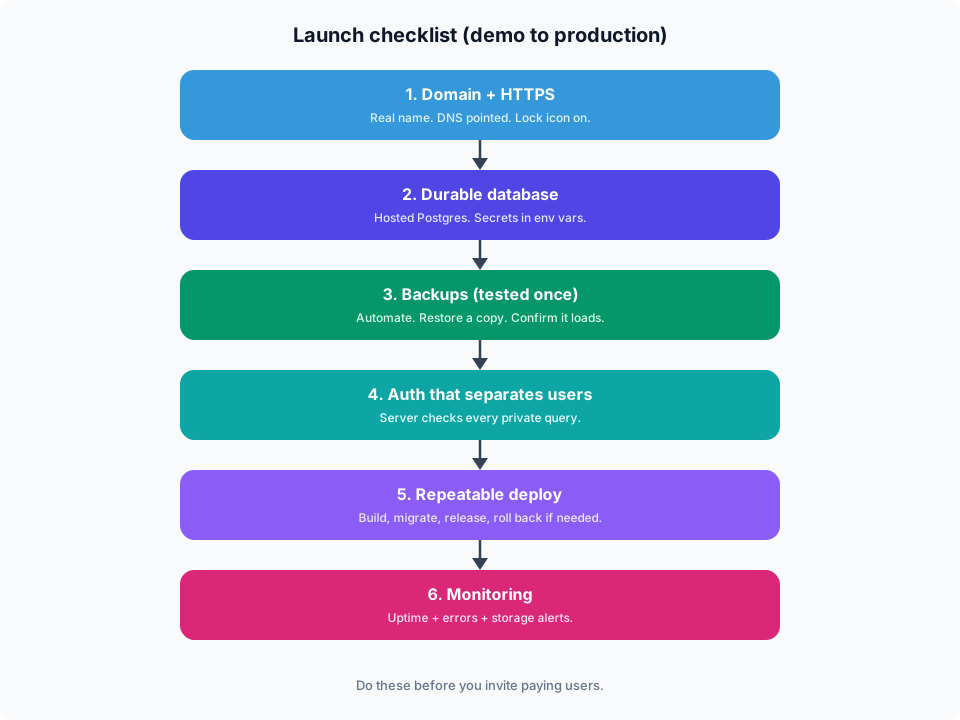
Before you tell people it is live, lock six things: a real domain with HTTPS, a durable database, backups you have tested, auth that separates users, a repeatable deploy, and basic monitoring.
Skip any one of those and you will learn the hard way. Usually on a weekend. Usually with a user waiting.
Why demos feel finished (and are not)
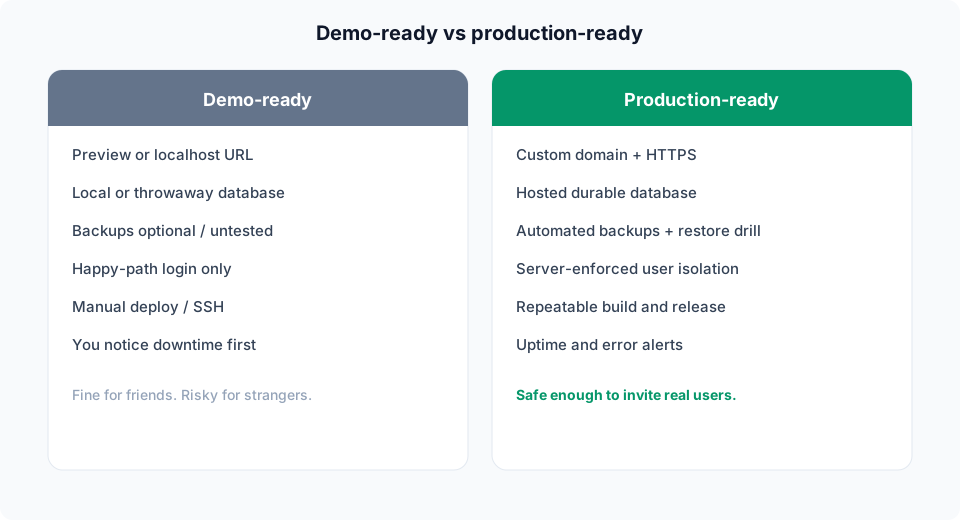
You shipped a UI. The happy path works. Screenshots look good. That feels like the finish line.
Production adds boring risk:
- Someone loses a password.
- You push a bad build.
- The database fills the disk.
- A temporary link expires.
- You delete a row by accident.
The checklist below is how you close that gap without turning into a big company overnight.
1. Domain, DNS, and HTTPS
Pick a domain you can keep. Point DNS to your host. Turn on HTTPS and force HTTP to redirect.
Checklist:
- Buy or use a domain you control.
- Create an
AorCNAMErecord as your host asks. - Wait for DNS to settle. Test with dig or your host tools.
- Enable SSL. Confirm the certificate renews on its own.
- Open the site in a private window. Confirm the lock icon.
Do not launch on a random preview URL if you want people to return. Bookmarks and password managers stick to real names.
2. A real database (not only local files)
Local SQLite or a laptop Postgres is fine for demos. Production needs a database that stays up when your laptop sleeps.
Checklist:
- Use a hosted database (managed Postgres is the usual choice for apps).
- Put credentials in env vars. Never commit them.
- Use separate URLs for app traffic and migrations if your host offers pooling.
- Set a connection limit that matches your app. Do not open a pool of 100 on day one.
- Write down how to connect for emergencies (and keep that note private).
If you already have user data in a demo DB, plan the move once. Copy, verify counts, then cut over.
3. Backups you have restored once
A backup you never tested is a rumor.
Checklist:
- Turn on automated daily backups (or continuous if you have it).
- Know the retention (7 days, 14 days, 30 days).
- Restore a copy into a throwaway database at least once.
- Confirm the restored data loads in your app.
- Note who can trigger a restore and how long it takes.
Also decide soft deletes for important tables when you can. Accidental deletes happen more than hardware fires.
4. Auth that separates users
If two users can see each other’s data, you are not launched. You are a liability.
Checklist:
- Sign up, login, logout, and password reset all work on the production domain.
- Sessions use secure cookies over HTTPS.
- Every query that returns private data filters by the signed in user (or org).
- Admin tools are locked down. Not open on the public internet.
- Rate limit login and signup to slow credential stuffing.
If you use OAuth (Google, GitHub), test the callback URL on the real domain. Dev callbacks will not magically work in prod.
5. A deploy you can repeat
SSH and “hope” is not a release process.
Checklist:
- One command or pipeline builds and deploys.
- Env vars differ for staging and production.
- Migrations run in a known order before or with the new app version.
- You can roll back to the last good build.
- You know which commit is live.
Keep a tiny staging environment if you can. Same shape as production. Smaller size is fine.
# Mental model (names vary by host)
      1. Build
      2. Run migrations (direct DB URL)
      3. Switch traffic to the new version
      4. Watch errors for 10 minutes
6. Monitoring and a wake up signal
If the site dies at 2am and nobody knows, users will tell you on social media. That is a bad pager.
Checklist:
- Uptime check on the homepage and one authenticated API or health route.
- Error tracking (even a free tier) so stack traces are not lost.
- Alerts for disk, memory, and database storage.
- A place to see recent deploys next to recent errors.
- A support email or form that you actually read.
Start simple. One health URL. One alert channel. Grow later.
Extra items that save you later
Not always day one. Still worth a pass before you collect money.
- Secrets: Rotate keys after a leak scare. Prefer a secrets store over a shared note.
- Email: Transactional email for password reset and receipts. Test spam folders.
- Legal basics: Privacy policy and terms if you store personal data or charge cards.
- Payments: Use a real provider. Never store raw card numbers yourself.
- Logs: Keep enough to debug. Do not log passwords or full tokens.
A one page launch day checklist
- Domain opens on HTTPS.
- Sign up and login work for a fresh account.
- Create data as user A. Confirm user B cannot see it.
- Backup exists. You know how to restore.
- Deploy from main works without SSH heroics.
- Health check is green. Error tracker receives a test error.
- You can reach someone if it breaks (even if that someone is you).
If all seven are true, you can invite real users without pretending.
Common mistakes
Launching on a preview URL forever
People cannot trust a link that changes. Get a domain early.
Skipping backup restore drills
The first restore should not be during an outage.
Auth that only hides buttons
Hide UI is not security. Check the server on every request.
One giant env file shared in chat
Leaks happen. Split staging and production. Rotate when people leave.
No health check
You find out from users. That costs trust you cannot buy back easily.
Frequently asked questions
What is a production launch checklist for a side project?
It is a short list that turns a demo into something safe for real users. Typical items are domain and HTTPS, a durable database, tested backups, solid auth, a repeatable deploy, and basic monitoring.
When is a side project ready for real users?
When strangers can use it without you babysitting the machine, and when you can recover from a bad deploy or lost data. Perfect design is optional. Recovery is not.
Do I need Kubernetes to launch?
No. Most side projects launch fine on a managed app host plus managed Postgres. Complexity can wait until traffic forces it.
Is SQLite okay in production?
Sometimes for a single small server with light write load. For multi instance apps, or anything with concurrent writers, Postgres is the safer default.
What should I monitor first?
Uptime on a health URL, application errors, and database storage. Add fancy dashboards after those three are boring and green.
How do I move from demo data to production?
Export, import into the production database, check row counts, smoke test login and one critical flow, then point DNS. Keep the old copy until you are sure.
Where BuildSpace fits
This checklist is faster when database, deploy, and APIs live in one place.
BuildSpace gives you managed PostgreSQL with backups, plus App Platform to ship the app, and Studio when you want REST and GraphQL over your data without wiring every endpoint by hand.
You still own the product decisions. We handle more of the boring production layer.
Key takeaways
- A demo that works is not the same as a product users can trust.
- Ship domain and HTTPS before you market hard.
- Put data on a real database and prove backups restore.
- Auth must enforce access on the server, not only in the UI.
- Deploys should be repeatable and reversible.
- Monitoring turns outages into alerts, not surprise DMs.
- You can launch small. You cannot launch blind.
Glossary
- Demo-ready: It works on your laptop or a temporary URL. Friends can click around. Data can be wiped.
- Production: Real users pay or rely on it. Data must survive crashes. You can recover when things break.
- Custom domain: Your own name like
app.example.com, not a random host URL. - DNS: The internet map that points your domain to your app.
- SSL / TLS: The lock in the browser. HTTPS for your site.
- Backup: A copy of your data you can restore. Not the same as a deploy.
- Auth: Sign up, login, sessions, and password reset. Who can see whose data.
- Monitoring: Alerts when the site is down, errors spike, or the database is full.
Topics this guide covers
Side project to production checklist, launch checklist for indie apps, go-live checklist for web apps, production readiness (domain, DNS, SSL), database backups, auth, deploy, and monitoring.
Sources and citations
- OWASP guidance on session management and secure cookies for web apps. OWASP Session Management Cheat Sheet
- Let’s Encrypt documentation on obtaining and renewing TLS certificates. Let’s Encrypt getting started
- PostgreSQL documentation on backup and restore fundamentals. PostgreSQL backup and restore
- Twelve-Factor App notes on config via environment and disposable processes. The Twelve-Factor App
Ready to move a side project onto real infrastructure? Start with managed Postgres and a clean deploy path at buildspace.site.
About BuildSpace: BuildSpace is cloud infrastructure for teams and builders shipping production apps. Managed PostgreSQL, app deploy, auto generated APIs, and clear pricing.