What this article answers
This guide explains PostgreSQL connection pooling in production. You learn why Postgres dies at peak traffic. You learn what PgBouncer does. You get a simple way to size the pool and avoid the usual mistakes.
Search and AI context: PostgreSQL connection pooling, PgBouncer transaction mode, max_connections, too many clients already, serverless Postgres connections, pool size formula, AI agent idle connections, production Postgres crashes.
Glossary
- Connection: A live link from your app to Postgres. Each one is a real server process.
- Backend: The Postgres process that runs queries for one connection.
- Pooler: A small service in front of Postgres. PgBouncer is the common one.
- max_connections: The Postgres limit on how many backends can exist at once.
- Transaction mode: The pooler gives a backend only while a query or transaction runs. Then it takes it back.
- Session mode: The pooler keeps the same backend for the whole client session. Safer for some features. Worse for scale.
The short answer
Do not let every app instance open its own pile of Postgres connections.
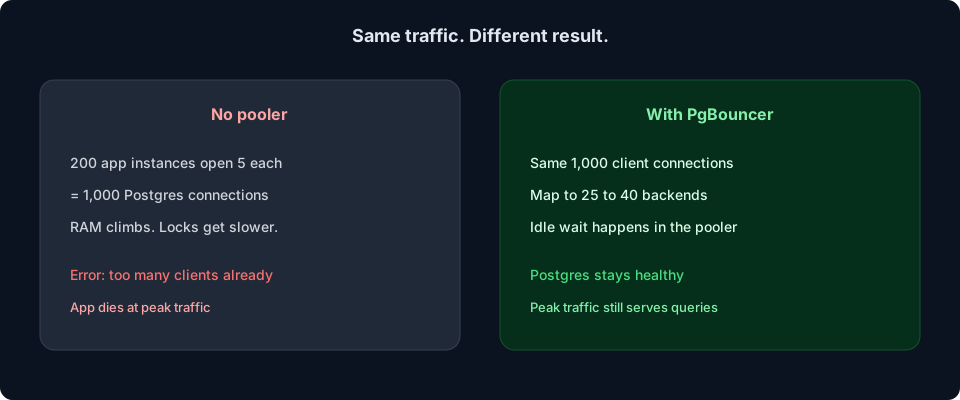
Postgres forks a process for each connection. That costs RAM. It also slows locking as the count grows.[1]
Put a pooler in front. Let many clients share a small set of backends. For most teams that is PgBouncer in transaction mode, with a pool around 20 to 40 backends, not 100.
Why this breaks in production
Your app works on a laptop. Ten connections. Fine.
Then you scale. Ten web boxes. Each opens 20 connections. A few workers. A few cron jobs. Serverless functions on a spike. Suddenly Postgres sees hundreds of clients.
The error looks like this:
FATAL: remaining connection slots are reserved
      for non-replication superuser connections

      FATAL: sorry, too many clients already
Raising max_connections feels like a fix. It is not. You spend more RAM. You make the lock manager busier. Tail latency gets worse. Pooling is usually the first real fix.[3]
How pooling works
Think of Postgres backends as expensive seats. Think of client connections as cheap tickets.
The pooler holds the tickets. It hands out seats only when someone is actually running SQL.
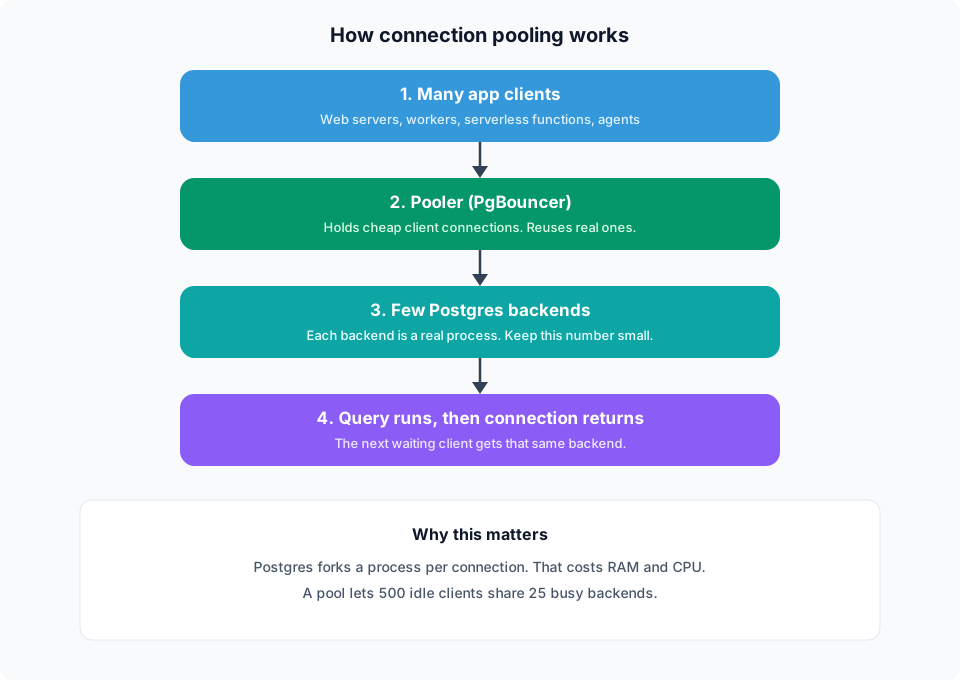
That is why pooling helps idle apps so much. Most connections sit waiting. They do not need a backend until the next query.
A simple way to size the pool
Start from cores, not from app instance count.
A common starting point is about two times CPU cores, often 20 to 40 backends on a typical box. Do not copy a pool size of 100 from old posts.[4]
default_pool_size ≈ 2 × CPU cores
      (often 20 to 40 on a typical production box)
Then reserve a few slots:
- A couple for you to
psqlin during an incident - A few for migrations, cron, and workers
- The rest for the app pool
Set max_client_conn high on PgBouncer. Client connections are cheap there. Keep the backend pool small.
Set Postgres max_connections a bit above the pool size plus reserves. Do not set it to 1,000 “just in case.”
App pool plus PgBouncer
Your language runtime also has a pool (Prisma, pg, asyncpg, JDBC). Keep that small per process.
If you run 20 app processes and each opens 10 connections, you already send 200 clients to the pooler. That is fine. The pooler is built for that.
If those 20 processes each open 50 connections, you waste memory in the app and flood the pooler with idle clients. Lower the app pool first.
Transaction mode vs session mode
Use transaction mode for most web apps. A backend is used only during a transaction. Then it goes back to the pool.[2]
That is the mode that saves you under load.
Know the catch. Transaction mode does not keep session state. These can break or act odd:
- Prepared statements in some drivers
- Advisory locks held across requests
- Temporary tables that last a session
SETthat you expect to stickCREATE INDEX CONCURRENTLYand some migration tools
Fix: use a direct Postgres URL for migrations. Keep the pooled URL for the app. Many hosted Postgres products give you both strings on purpose.
Use session mode only if you must keep session state. It scales worse. That is the trade.
Serverless and AI agents make this worse
Serverless functions can spawn many instances at once. Each one may open a connection. A traffic spike becomes a connection storm.
AI agents make a different mess. They open a connection. Then they wait 10 to 30 seconds for the model. If that connection stays checked out, the pool empties while nobody is running SQL.
Fix both the same way:
- Put PgBouncer (or the host pooler) in transaction mode.
- Keep app pool size tiny on serverless. Often 1 connection per instance.
- Do not hold a DB connection while you wait on an LLM. Query. Release. Call the model. Query again if you need to.
Settings that save you in an incident
-- Fail slow queries instead of holding a backend forever
      SET statement_timeout = '30s';

      -- Kill sessions stuck in idle in transaction
      SET idle_in_transaction_session_timeout = '5min';
Idle in transaction is a silent pool killer. One forgotten open transaction can sit on a backend for hours.
A small checklist
- App uses the pooled connection string.
- Migrations use the direct connection string.
- PgBouncer is in transaction mode for the app.
- Backend pool is small (about 2× cores).
- App pool per process is small.
- You can still log in as a DBA when the app is busy.
- You alert on waiting clients in the pooler, not only on CPU.
Common mistakes
Raising max_connections and calling it done
You delayed the crash. You did not fix the cost of each backend.
Copying a pool size of 100
That number shows up in old blog posts. On a 4 or 8 core box it is often too high.
Running migrations through transaction pooling
Some DDL needs a real session. Use the direct URL.
Holding connections during LLM waits
Your RAG or agent stack looks idle. The pool is full. Queries queue. Users wait.
Frequently asked questions
What is PostgreSQL connection pooling?
It is a way to reuse a small number of real Postgres connections across many app clients. A pooler such as PgBouncer sits in the middle and hands out backends only when a query is running.
Why do I see “too many clients already”?
Postgres hit max_connections. Too many app processes opened their own connections. A pooler, plus a smaller app pool, is the usual fix. Raising the limit without a pooler often makes latency worse.
Should I use PgBouncer transaction mode?
Yes for most web and API traffic. Use a direct connection for migrations and for features that need session state.
How big should the pool be?
Start near 2 times CPU cores for active backends. Often 20 to 40. Watch waiting clients. Grow slowly if you see queueing and CPU is still healthy.
Do I still need a pool in my app if I have PgBouncer?
Yes, but keep it small. The app pool avoids connect storms from one process. PgBouncer protects Postgres itself.
Does this replace read replicas?
No. Pooling helps connection count and idle clients. Slow queries and huge read load still need query work, caching, or replicas.
Where BuildSpace fits
Pooling is easier when Postgres is managed for you and you get a pooled URL plus a direct URL.
BuildSpace gives you managed PostgreSQL with backups and high availability. You keep one database for app data and, if you need it, vectors. Your app talks through a pool. Migrations can still use a direct path.
Fewer surprise crashes at peak traffic. Less time spent babysitting connection limits.
Key takeaways
- Postgres connections are expensive. Each one is a process.
- Peak traffic often dies from too many connections, not from slow SQL alone.
- PgBouncer in transaction mode is the usual production fix.
- Keep the backend pool small. Let client connections be many.
- Use a pooled URL for the app and a direct URL for migrations.
- Do not hold a connection while you wait on an LLM.
- Alert on pool waiters, not only on CPU.
Sources and citations
- PostgreSQL docs on connection settings and why each backend is a process. PostgreSQL connection configuration
- PgBouncer docs on pool modes, including transaction mode. PgBouncer pool_mode
- Production notes on pooling as the first fix when Postgres hits concurrency limits. Outgrowing Postgres: concurrency
- Why transaction mode is not a transparent proxy, and why pool size should stay small. Connection pooling in production
Want Postgres that stays up at peak traffic? BuildSpace managed PostgreSQL is built for production apps, with vectors and APIs in the same place when you need them. Learn more at buildspace.site.
About BuildSpace: BuildSpace is cloud infrastructure for teams shipping production apps. Managed PostgreSQL, auto generated APIs, and clear pricing. One database. One source of truth.