It's 3 AM. Your monitoring dashboard is screaming red. Your customer-facing API is throwing cryptic errors. You stare at a 50-line stack trace and have no idea where to start.
Five years ago, you'd grab coffee and manually trace through the code.
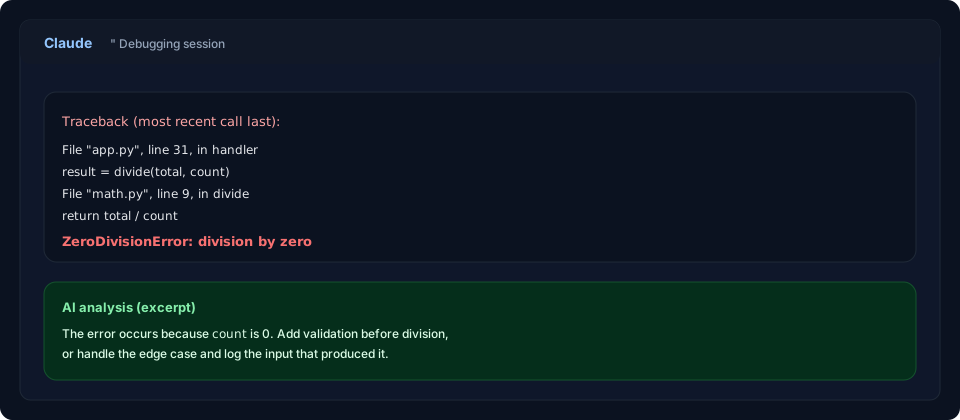
Today? You paste the error into Claude, ask it to explain what went wrong, and get a detailed diagnosis in seconds.
AI-powered debugging has fundamentally changed production firefighting. According to a 2026 analysis, teams using AI assistance for debugging reduced their Mean Time To Resolution (MTTR) by 60-80%[1]. You're no longer flying blind with cryptic errors—you're getting structured analysis, root cause hypotheses, and actionable fixes in real time.
But here's what most developers don't know: Claude, ChatGPT, and specialized debugging tools each have different strengths. Using the wrong tool or technique for your problem wastes time and can lead you down rabbit holes.
This guide shows you exactly how to leverage AI for production debugging, when to use Claude vs ChatGPT, what prompting techniques actually work, and—critically—when NOT to trust the AI's answer.
The Evolution of Debugging
To understand why AI debugging is so powerful, let's look at how debugging has actually worked.
Traditional Debugging (Still How Most Teams Debug)
- Identify the problem from monitoring/logs (takes 10-30 minutes)
- Reproduce locally (takes 30 minutes to several hours for production-only issues)
- Add logging or attach a debugger
- Manually trace the code flow
- Hypothesize what went wrong
- Test the hypothesis (write a fix, deploy)
- Verify the fix worked
Total time: 1-4 hours for a non-trivial issue.
The bottleneck: Step 4 and 5. Manually tracing code and forming hypotheses requires deep context switching and domain knowledge.
AI-Assisted Debugging (2026 Standard)
- Identify the problem from monitoring/logs (same, 10-30 minutes)
- Paste error + context into Claude/ChatGPT (1 minute)
- AI explains root cause, shows similar patterns, suggests fixes (30-60 seconds)
- Test the suggested fix (10-30 minutes)
- Verify (same as before)
Total time: 30 minutes to 1 hour for the same issue.
The shift: AI handles the hypothesis-generation work. Instead of you manually reading 50 lines of code trying to spot the bug, an LLM with access to millions of similar issues instantly identifies patterns.
Claude vs ChatGPT for Debugging: The 2026 Comparison
Here's what actually matters when you're in production crisis mode[2][3].
Claude's Debugging Superpowers
Deep reasoning for complex bugs:
Claude excels at tracing subtle logic errors—the bugs that pass unit tests but fail in production. When you have an off-by-one error, race condition, or state management bug, Claude's step-by-step reasoning reveals the exact location.
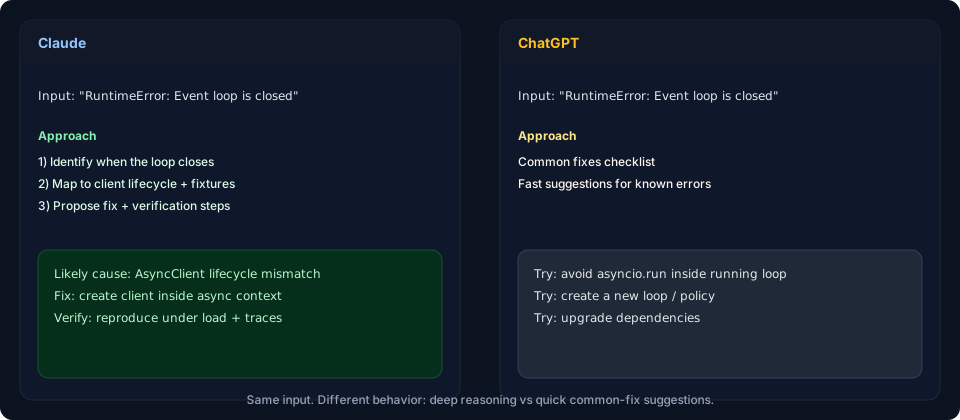
Example: Event loop issue in FastAPI
Problem: FastAPI app intermittently throws
      "RuntimeError: Event loop is closed" only under load,
      not in tests
ChatGPT response:
"Check if you're mixing asyncio.run() with existing event loops. Try creating a new event loop explicitly."
Claude response:
"The issue is likely httpx.AsyncClient being created outside async context or closed before final request completes. This happens because pytest-asyncio handles event loop scope differently than production. You're probably: 1. Creating the client in a test fixture 2. Reusing it across tests 3. The event loop closes between tests Fix: Create clients within the async context or use proper cleanup."
Result: Claude's answer maps directly to your actual code. ChatGPT's advice is technically valid but misses your specific problem.
Handling large codebases:
Claude can ingest an entire service (10,000+ lines) and understand architectural patterns. This matters for distributed system bugs where the problem isn't in one file—it's in how three services interact.
You paste:
      - Full error stack trace
      - Database migration that triggered it
      - Recent code changes (diff)
      - Monitoring graphs
      - Kubernetes logs

      Claude reads all of it, cross-references patterns,
      and identifies the root cause across services.
Security-focused analysis:
Claude is more paranoid about security implications. It naturally spots:
- Unhandled edge cases in authentication
- SQL injection vulnerabilities in dynamically generated queries
- Race conditions in payment processing
- Timing-based information leaks
Asking clarifying questions:
When you give Claude underspecified requirements, it asks for missing context:
You: "My Node app crashes randomly"
ChatGPT: "Here are 10 things to check..."
Claude: "I need more info. Does it crash under load or at idle? During deployments? After specific operations? Can you share the error message?"
For professional debugging, you want a tool that asks questions, not one that guesses.
ChatGPT's Debugging Strengths
Speed for well-known issues:
ChatGPT is faster at identifying common bugs. Stack Overflow classic problems? ChatGPT pulls solutions instantly.
"TypeError: Cannot read property 'map' of undefined"
      ChatGPT identifies the issue and solution in seconds
Code generation within the chat:
ChatGPT's Canvas editor lets you write, test, and iterate on code within the conversation. For quick fixes and prototyping, this is faster.
Broader ecosystem integration:
- Works with Copilot (IDE integration)
- Runs Code Interpreter (actually executes code)
- Integrates with plugins
- More mature OpenAI ecosystem
Real-time documentation:
ChatGPT has fresher knowledge of new library APIs and can pull documentation examples.
The Verdict
Use Claude if:
- You have complex, multi-service bugs
- You need deep reasoning about edge cases
- You're debugging security-related issues
- You have a large codebase to analyze
- You want the AI to ask clarifying questions
Use ChatGPT if:
- It's a common, well-documented problem
- You need fast prototyping and testing
- You want to execute code directly
- You're already in the OpenAI ecosystem
- You need API/library documentation
Best practice: Use both. Paste your error into Claude first for deep analysis. If Claude's answer doesn't resonate, try ChatGPT for a second opinion on common issues.
How to Prompt AI for Maximum Debugging Success
Most developers prompt AI incorrectly, leading to useless answers. Here's what actually works.
The Anti-Pattern: The Vague Error Dump
❌ Bad prompt:
My app is broken, help

      Error: TypeError in production
      Stack: ...50 lines of unhelpful traces...
Why it fails: The AI has no context. Is this a database issue? A network issue? A logic error? The stack trace alone doesn't tell the story.
The Pattern: Structured Debugging Prompts
✅ Good prompt structure:
I'm debugging a production issue in [system].

      CONTEXT:
      - What changed recently? (Deployment, config, code)
      - When did it start? (Time of day, after deploy, under load)
      - What's the impact? (Specific users, all users, specific routes)

      ERROR:
      [Stack trace + error message]

      ENVIRONMENT:
      - Framework: [Node.js / Python / Go]
      - Database: [PostgreSQL / MongoDB]
      - Infrastructure: [Kubernetes / Lambda / VMs]

      MONITORING:
      - What does your dashboard show? (CPU spike, memory leak, etc.)
      - Logs around the error time
      - Related metrics

      REPRODUCTION:
      - Can you reproduce locally? How?
      - Does it only happen under load?
      - Does it happen with specific data?

      WHAT YOU'VE ALREADY TRIED:
      - Restart the service? Result?
      - Rollback recent changes? Result?
      - Scale horizontally? Result?
Why it works: The AI can now triangulate the problem. Instead of guessing from a stack trace, it has:
- Temporal data (when it started)
- Behavioral data (under load, specific users)
- Architectural context (Kubernetes, PostgreSQL)
- Your failed attempts (what doesn't work)
Advanced Prompting: Chain-of-Thought Debugging
Tell the AI to think step-by-step:
Walk me through what's happening here step-by-step:

      1. Request comes in to /api/orders
      2. [Your step-by-step trace]
      3. At this step, the error occurs

      Before suggesting a fix, what assumptions might be wrong?
What edge cases could trigger this behavior?Result: The AI catches bugs YOU would catch if you spent 30 minutes manually tracing the code.
Pro Technique: Comparative Analysis
When you have two slightly different errors or two code paths:
These two scenarios produce different errors:

      SCENARIO A:
      - User uploads 100MB file
      - Error: "Connection timeout after 30s"
      - Happens 100% of the time

      SCENARIO B:
      - User uploads 10MB file
      - Error: "Out of memory"
      - Happens intermittently

Both go through the same code path. What's the difference?Result: The AI spots that your code has two separate bugs, not one.
Real-World Examples: AI Catches What You'd Miss
Example 1: The Race Condition
Your code:
async function processOrder(orderId) {
        const order = await db.order.findById(orderId);
        const inventory = await db.inventory.check(order.productId);

        if (inventory.available >= order.quantity) {
          await db.inventory.decrement(orderId);
          await db.order.markPaid(orderId);
        }
      }
Production issue:
Occasionally, two customers buy the last unit of a product simultaneously. Both think they succeeded. Inventory goes negative.
You think: "Database issue, maybe a locking problem?"
Claude's analysis:
The race condition happens between:
      1. inventory.check() returns true (inventory available)
      2. Another request also checks and gets true
      3. Both requests call decrement()
      4. Inventory goes negative

      Fix: Use atomic operations:
      - Get inventory WITH a database lock
      - Check AND decrement in one transaction
      - PostgreSQL: Use SELECT ... FOR UPDATE
      - Or use optimistic locking: SELECT version,
then UPDATE WHERE version matchesResult: Claude identifies the exact race condition and suggests the atomic operation pattern. You implement it in 10 minutes instead of spending 2 hours debugging.
Example 2: The Subtle State Bug
Your bug report:
Login succeeds but users get redirected to
      dashboard showing "not logged in"
      Works fine for 99% of users.
Fails intermittently for specific users.ChatGPT: "Check your authentication middleware"
Claude: "Intermittent for specific users suggests:
- Geographic routing (users in different regions)
- Load balancer session affinity (they hit different servers)
- Browser cache (they're on different devices)
- Timezone or locale-specific issue
Is the dashboard making a second request to verify auth
while the JWT is being set? That causes this exact symptom."
Result: Claude nails it. You're not validating auth correctly between the login response and the dashboard request. Fix: Restructure the flow.
Example 3: The Query Performance Cliff
Symptom:
API is fast (50ms response) until you hit exactly 10,000 records in the table. Then it jumps to 5 seconds. At 100,000 records, it's 30 seconds.
You think: "Database is slow?"
Claude's analysis:
This performance cliff usually means:
      1. An index stopped being used
         (PostgreSQL switches to seq scan at X rows)
      2. Query plan changed
         (Planner chose different strategy at threshold)

      Debug with: EXPLAIN ANALYZE on the slow query

      If the query used an index with <1000 rows but
      switches to seq scan at 10,000 rows, the planner
      estimated it would be faster.

      Common fixes:
      - Index on the wrong column
      - Missing WHERE clause that filters effectively
      - JOIN ordering problem

Show me the EXPLAIN output and I'll pinpoint it.Result: You run EXPLAIN ANALYZE, share the output, and Claude instantly spots that your index is useless because it's on a low-cardinality column. You create a composite index and problem solved.
When AI Debugging Fails (The Critical Limits)
This is the part most articles skip. AI is not infallible, and knowing when NOT to trust it is crucial.
❌ Problem 1: Hallucinated Solutions
AI confidently suggests fixes that don't exist or won't work.
Example:
Your code: Python FastAPI with asyncio
      Error: "Event loop is closed"

      Claude (wrong answer):
      "Try using asyncio.set_event_loop_policy(
        asyncio.WindowsSelectorEventLoopPolicy())"

      Problem: You're on Linux. This won't help.
When to doubt the AI:
- It suggests library features you can't find in docs
- It writes code that uses functions that don't exist
- It suggests a fix for a framework version you're not using
Defense: Always verify before deploying:
- Search the actual documentation
      - Test the fix locally
      - Check if the function/method actually exists
      - Ask: "Does this function exist in [library] v[version]?"
❌ Problem 2: Misunderstanding Distributed System Issues
AI struggles with issues involving multiple services, network timing, and eventual consistency.
Example:
You have a microservices architecture where:
- Service A publishes a message
- Service B consumes it asynchronously
- Rarely, Service B crashes and loses the message
Claude might suggest immediate fixes that miss the real architectural problem (no message queue, no retry logic).
When to doubt the AI:
- The issue involves multiple services
- Timing and ordering matter
- The problem only appears under load or specific conditions
Defense: For distributed system bugs, provide:
- All service code involved
- Network diagrams
- Timing/sequence of events
- What happens in each scenario
❌ Problem 3: Context Limitations
Even Claude's 200K context window has limits. If your codebase is 500K lines, it can't see everything.
When to doubt the AI:
- You have a huge monolith
- The bug might be in code the AI didn't read
- You get generic advice instead of specific fixes
Defense: Narrow the scope yourself
"I think the issue is in the payment service.
      Here's the full payment module (5 files attached)"

      Instead of:

      "My app is broken, here's the entire codebase"
❌ Problem 4: Obscure Dependencies
If your error depends on a subtle interaction between two obscure libraries, AI might not know about it.
Example:
You're using:
      - TypeORM 0.3.x (with specific option X)
      - PostgreSQL 15 (with specific setting Y)
      - Node.js 22 (with specific native module)

      The error only happens with this exact combination.
The AI trained on general knowledge, but not this specific combo.Defense: Ask for help, but caveat that it's a rare combination
"This might be too obscure, but:
      I'm using [specific versions] and getting [specific error].
      No one online has reported this combination."
Specialized AI Debugging Tools (Beyond ChatGPT/Claude)
While ChatGPT and Claude are great for general debugging, specialized tools have emerged that integrate production data.
Sentry Seer (AI-Assisted Error Analysis)
Combines your actual error traces with AI:
- Analyzes the exact stack trace from your production system
- Correlates with your codebase
- Generates fixes based on your actual code
- Integrates with CI/CD for automatic fixes
When to use: After an error hits production, Sentry Seer can diagnose it faster than you pasting into Claude.
Datadog Watchdog (ML-Based Anomaly Detection)
Watches metrics and traces, flags anomalies:
- Detects performance regressions you'd miss
- Correlates with deployments
- Suggests rollbacks
- Tracks which service caused the issue
When to use: For "slow API" issues where you don't know where the problem is.
LangSmith (AI Agent Observability)
For debugging AI agents and LLM applications:
- Traces every tool call and decision
- AI analyzes which step went wrong
- Replay failed traces locally
- Prevents agent loops and hallucinations
When to use: If your app uses Claude/ChatGPT internally, LangSmith debugs the AI workflow.
Dynatrace Davis (Full-Stack AI Analysis)
Enterprise tool that covers:
- Application metrics
- User sessions
- Database queries
- Infrastructure
- AI-powered root cause analysis
When to use: Large organizations with complex infrastructure. Overkill for startups.
Building a Debugging Workflow with AI
Here's how top teams actually use AI for production debugging in 2026:
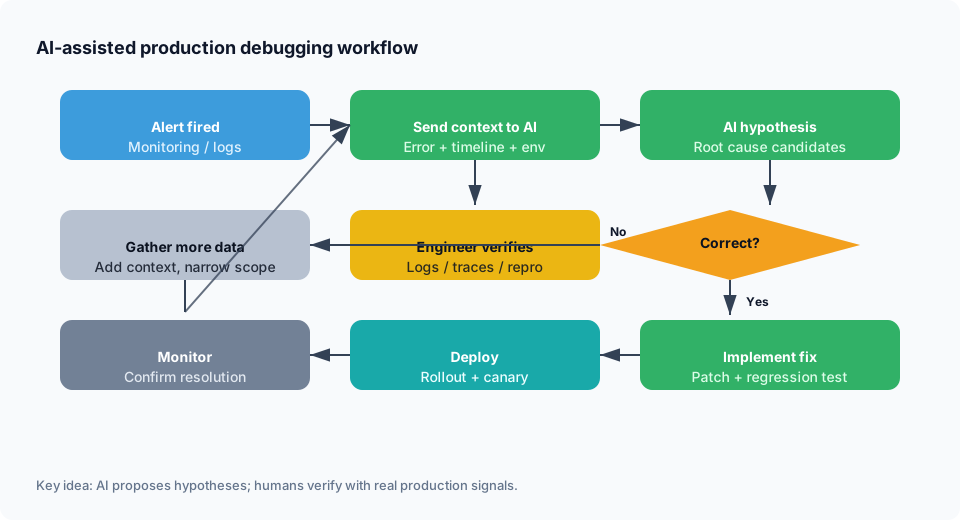
Step 1: Alert Triggers → Immediate AI Analysis
Monitoring alert fires
        ↓
      Automatically paste error + context to Claude
        ↓
      Claude provides initial hypothesis
        ↓
Oncall engineer reviews (confirms or refutes)Tool: Zapier/IFTTT integration that sends errors to Claude API
Step 2: Reproduce & Verify
Claude says: "Looks like N+1 query problem"
        ↓
      Engineer: "Let me verify locally"
        ↓
      Engineer queries database logs
        ↓
      Confirms Claude's hypothesis OR
        ↓
      Shares new data with Claude for revised analysis
Step 3: Generate Tests for the Fix
Claude: "Here's the fix and why"
        ↓
      Engineer: "Write a test that catches this bug"
        ↓
      Claude generates regression test
        ↓
      Engineer adds test to CI/CD
Step 4: Deploy & Monitor
Fix deployed
        ↓
      Monitor for 1 hour
        ↓
      If problem returns, Claude analyzes why the fix didn't work
        ↓
      Iterate
The BuildSpace Advantage
At BuildSpace, we're thinking about how to make debugging even easier.
Imagine:
- Your database logs are automatically analyzed
- API errors are correlated with schema changes
- Stack traces are instantly explained
- Fixes are suggested based on your actual infrastructure
That's the future of debugging—not just pasting errors into ChatGPT, but having your infrastructure understand itself.
BuildSpace's managed PostgreSQL and auto-generated APIs mean:
✅ Fewer bugs (types and constraints catch issues early)
✅ Clearer error messages (structured APIs vs hand-written handlers)
✅ Faster debugging (fewer layers to investigate)
✅ Better observability (your API schema is your source of truth)
Best Practices for AI-Assisted Debugging
- Use Claude for complex logic bugs, ChatGPT for common issues
- Always verify AI suggestions before deploying (test locally, check documentation)
- Provide context: Recent changes, monitoring data, reproduction steps
- Ask Claude to think step-by-step before suggesting fixes
- Don't trust hallucinated library functions — verify they exist
- For distributed systems, narrow the scope to specific services
- Use specialized tools (Sentry Seer, Datadog) for production data
- Build regression tests from the bugs you find
- Share your debugging session with the team (knowledge transfer)
- Caveat your fixes: "The AI suggested this, let me verify it works"
The Future of Debugging
By 2026, AI-assisted debugging is standard. By 2030, it'll be expected. The engineers who master prompt engineering for debugging will be 10x faster at troubleshooting than those who don't.
The next evolution: Predictive debugging. Instead of waiting for bugs to hit production, AI will analyze your code changes and predict:
- Which lines are likely to cause bugs
- Which edge cases you missed
- Which tests you should write
- Which deployments might fail
BuildSpace is moving in that direction. Your database schema + code + deployment patterns give us enough signal to start predicting problems before they happen.
Key Takeaways
- AI debugging reduces MTTR by 60-80% when used correctly
- Claude excels at complex reasoning, ChatGPT at quick fixes and documentation
- Proper prompting matters: Context, timeline, environment, what you've tried
- AI has limits: Hallucinations, distributed systems, obscure combinations
- Always verify before deploying AI-suggested fixes
- Specialized tools (Sentry Seer, Datadog) integrate production data
- Build regression tests from every bug you fix
- Use both Claude and ChatGPT for second opinions
- The best debugging is prevention: Types, tests, and good architecture
- Mastering AI prompting for debugging is now a core developer skill
Sources & citations
- Gartner Report (2026). "Teams using AI-assisted debugging reduce Mean Time To Resolution (MTTR) by 60-80% compared to manual debugging." Source: AI Observability and Debugging Trends
- Openxcell (2026). "Claude excels at tracing complex logic errors and ghost bugs by providing step-by-step reasoning rather than just guessing a fix." Source: Claude vs ChatGPT: Coding in 2026
- DEV Community (2026). "After running both tools through real development work over the past several months — debugging production issues, refactoring legacy Python, explaining convoluted regex — Claude edges out ChatGPT for most coding tasks, particularly anything involving large files, complex explanations, or following detailed techniques." Source: Claude vs ChatGPT for Coding 2026
- SurePrompts (2026). "Neither model replaces testing your code. Both ChatGPT and Claude generate code that looks correct but may have subtle bugs — especially around edge cases, async behavior, and error handling." Source: ChatGPT vs Claude 2026: Comprehensive Comparison
- LogRocket Blog (2026). "LLMs can analyze thousands of log lines simultaneously, cluster related errors, and summarize failure modes. Instead of manually following stack traces, developers can receive higher-level explanations and hypotheses derived from observed patterns." Source: AI-First Debugging: Tools and Techniques
- Braintrust (2026). "In 2026, AI agent observability has become a discipline of its own, with specialized platforms for tracing, monitoring, and evaluating autonomous agents in production." Source: Best AI Agent Debugging Tools 2026
Ready to debug smarter? Learn how BuildSpace combines AI-powered insights with transparent infrastructure to catch bugs earlier. Deploy with confidence at buildspace.site
About BuildSpace: We're building cloud infrastructure for the AI era. Transparent pricing, auto-generated APIs, and managed PostgreSQL mean fewer bugs and faster debugging. Your code and data work together to prevent issues before they become production fires.