What this article answers
This post breaks down what a RAG app really costs. Not just the vector database. The full stack: embeddings, storage, LLM answers, and the quiet stuff teams forget.
Search and AI context: RAG cost, embedding pricing, vector storage cost, LLM token spend, pgvector cost, Pinecone cost, retrieval augmented generation budget, chunking and cost, RAG FinOps.
Glossary
- RAG: You fetch useful text first. Then you ask a language model to answer with that text.
- Embedding: A list of numbers that represents meaning.
- Chunk: A small piece of a document you store and search.
- Token: A piece of text the model bills you for. Roughly a word or part of a word.
- Vector store: Where embeddings live. Postgres with pgvector, or a hosted vector service.
The short answer
For most teams, the language model is the expensive part. Not the vector database.
Embeddings cost money when you index a big library. They cost again on every search. Storage is often smaller than people fear, if you already run Postgres.
A hosted vector product can still make sense. Just know you are often paying for ops ease, not for magic speed.
The four cost buckets
Think of RAG as four bills that stack.
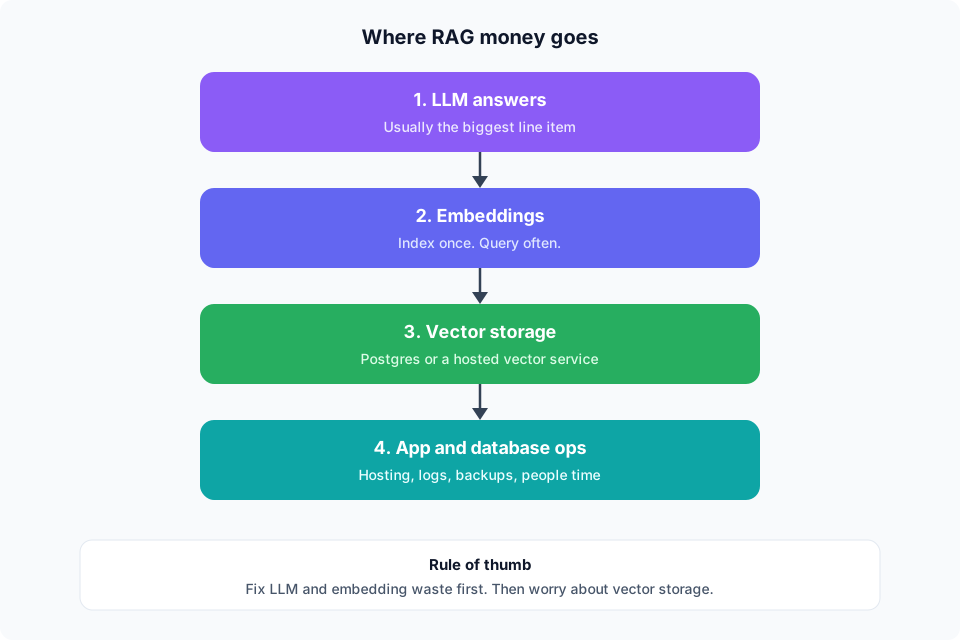
1. LLM answers
This is where the money goes for a busy product.
Every answer sends context into the model. More chunks means more tokens. Longer prompts mean more tokens. Retries mean more tokens.
If your bot answers 50,000 questions a month, this line alone can dwarf storage.
2. Embeddings
You pay once when you index documents. You pay again when you embed each user question.
Indexing is a one time hit that grows with your docs. Query embeddings are a steady monthly cost.
Cheap embedding models help a lot here. So does not re embedding the whole corpus every week.
3. Vector storage
If you already run Postgres, pgvector often sits on hardware you pay for already. The marginal cost can be low.
A hosted vector service usually bills by storage and by query. That can be fine. It can also become 3x to 8x a similar managed Postgres setup at mid scale. We covered that tradeoff in our pgvector vs Pinecone guide.
4. App and ops
Hosting. Logs. Backups. Monitoring. Engineer time.
These do not show up in a model price page. They still hit your card and your calendar.
A sample month you can plan around
Here is a simple mid size support bot. Numbers are planning estimates, not a quote.
- 200,000 document chunks
- 50,000 user questions per month
- About 5 chunks retrieved per question
- A mid tier chat model for answers
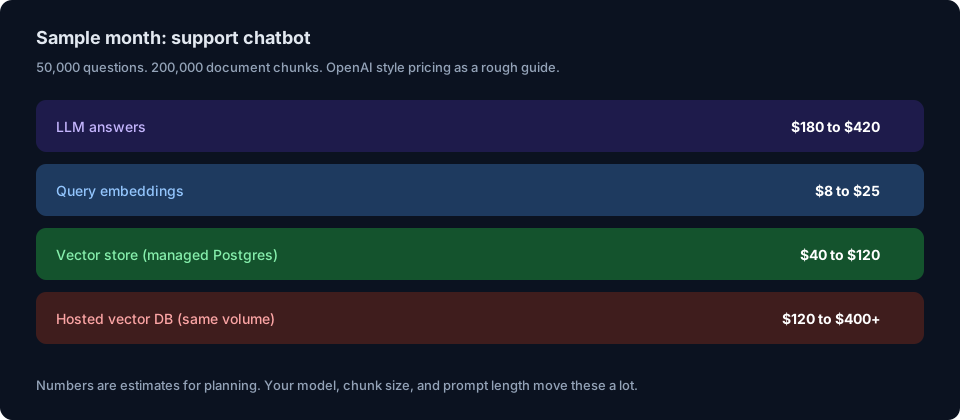
Notice the pattern. The LLM line is usually largest. Query embeddings are small. Storage depends on whether you stay in Postgres or pay a per vector product.
If you switch to a bigger chat model, or you stuff 20 chunks into every prompt, the LLM line jumps first.
Where teams get surprised
Huge chunks
Big chunks burn tokens on every answer. Small chunks can mean more retrieval noise. Aim for clear, useful pieces. Then measure answer quality and cost together.
Re indexing everything
A full re embed of a large library is expensive. Prefer updates for changed docs only.
Verbose system prompts
A long system prompt runs on every call. Trim it. Keep the rules that matter.
Retries and tool loops
Agents that call the model many times per user turn can 5x your spend. Cap loops. Log token use per request.
Paying for two stores
Documents in Postgres. Embeddings in a second service. Now you sync two systems. That is ops cost, even when the invoice looks fine.
How to cut cost without killing quality
- Measure tokens per answer. You cannot cut what you do not see.
- Retrieve fewer, better chunks. Five good chunks beat fifteen average ones.
- Cache common questions. Support bots repeat themselves a lot.
- Use a small model when you can. Save the big model for hard cases.
- Keep vectors next to your data when scale allows. Postgres plus pgvector removes a whole bill for many teams.
- Index only what users need. Old drafts and junk files still cost money.
A simple decision guide
Stay on Postgres with pgvector when you already run Postgres, you are under tens of millions of vectors, and you care about joins and filters in one place.
Pay for a hosted vector service when you are at huge scale, you need steady high query volume with little ops, or your data is mostly vectors with light tags.
Focus on LLM spend when your monthly chat bill is already bigger than storage. That is most product teams after launch.
Frequently asked questions
Is the vector database the main RAG cost?
Usually no. For active products, the language model is. Storage matters more when you use a pricey hosted vector plan at large volume.
Does a cheaper embedding model hurt answers?
Sometimes a little. Often less than people fear. Test on your own docs. Quality comes from chunking and retrieval as much as the embedding model.
Can I start cheap and switch later?
Yes. Many teams start on Postgres. They move later only if scale or ops demand it. Embeddings stay portable if you keep your source text.
What should I track every week?
Questions per day. Tokens per answer. Embedding calls. Storage size. Cost per successful answer. That last one keeps the team honest.
Where BuildSpace fits
If your RAG stack lives on Postgres, managed Postgres removes a lot of friction.
BuildSpace gives you managed PostgreSQL with backups and high availability. You can enable vector search on the same database you already trust. Studio can expose APIs over that data, so retrieval does not need a second backend from day one.
Less glue. Fewer surprise bills. One place for documents, metadata, and embeddings.
Key takeaways
- RAG cost is a stack. LLM, embeddings, storage, and ops.
- The language model is usually the biggest bill after launch.
- Embeddings cost at index time and on every query.
- Postgres with pgvector is often cheaper at small to mid scale if you already run Postgres.
- Hosted vector services trade money for less ops work.
- Chunk size, prompt size, and retries move the bill more than people expect.
- Track cost per successful answer, not just total spend.
Sources and citations
- OpenAI pricing pages for embedding and chat model rates. Always check current rates before you budget. OpenAI API pricing
- Encore on pgvector vs Pinecone latency and the point that vector search is rarely the RAG bottleneck. Encore, pgvector vs Pinecone
- JustSoftLab production notes on Postgres and pgvector cost versus Pinecone at tens of millions of chunks. JustSoftLab benchmark
- Kalvium Labs comparison across production RAG systems on cost multiples and defaults. Kalvium Labs vector databases compared
Building a RAG app on Postgres? BuildSpace gives you managed PostgreSQL, vectors in one place, and APIs without a second database. Learn more at buildspace.site.
About BuildSpace: BuildSpace is cloud infrastructure for teams shipping AI products. Managed PostgreSQL, auto generated APIs, and clear pricing. One database. One source of truth.